Draw Ellipse
Explanation
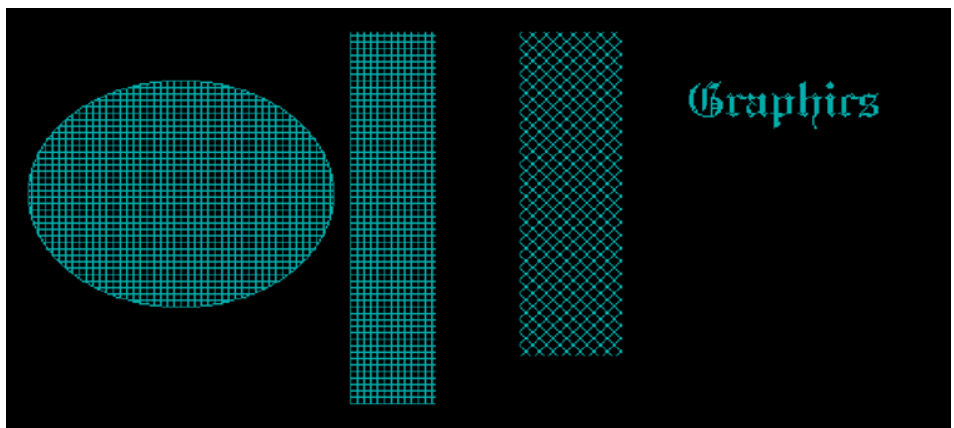
The graphics.h library provides functions to draw and fill different graphical objects. In this program, graphics mode is initialized, text is displayed, a filled ellipse is drawn, and two filled rectangles are created using different fill styles.
How It Works?
- Step 1: Include the
graphics.hheader file. - Step 2: Initialize graphics mode using
initgraph(). - Step 3: Set the drawing color using
setcolor(). - Step 4: Display text using
outtextxy(). - Step 5: Set a fill pattern using
setfillstyle(). - Step 6: Draw a filled ellipse using
fillellipse(). - Step 7: Draw filled rectangles using
bar(). - Step 8: Wait for a key press using
getch().
Example Program
#include <stdio.h>
#include <conio.h>
#include <graphics.h>

main()
{

    int gd = DETECT, gm;

    initgraph(&gd, &gm, "C:\\Turboc3\\Bgi");

    setcolor(3);

    settextstyle(4, 0, 4);

    outtextxy(400, 70, "Graphics");

    setfillstyle(7, 3);

    fillellipse(100, 150, 90, 70);

    bar(200, 50, 250, 280);

    setfillstyle(8, 3);

    bar(300, 50, 360, 250);

    getch();

}
Output