ViewData
What is ViewData?
ViewData is used to pass data from a Controller to a View in an ASP.NET MVC application.
It works like a dictionary (key–value pair).
Key = String
Value = Object
Why Do We Use ViewData?
- To send small amount of data
- Data is needed for one request only
- No need to create a full Model
Real-Life Example:
Imagine a teacher writes a student’s name on a small paper and gives it to the monitor to show on the board.
- Teacher → Controller
- Paper → ViewData
- Board → View
The paper is temporary. After showing, it is not saved permanently. Same way, ViewData is temporary.
Example:
Controller Code:
public ActionResult Index()
{
    ViewData["StudentName"] = "Ali";
    ViewData["Marks"] = 85;

    return View();
}
View Code:
<h2>
    Student Name:
    @ViewData["StudentName"]
</h2>

<h3>
    Marks:
    @(int)ViewData["Marks"]
</h3>
Passing Data from Business Layer to View Using ViewData
Inside the Models folder, right-click and select Add → Class. Create a new class file named Student.cs .
This class defines the student properties (such as Name, Address, etc.) and represents the structure of student data used in the application.
using System;
using System.Collections.Generic;
using System.Linq;
using System.Web;

namespace Your_Web_Application__Name.Models
{
    public class Student
    {
        public int StudentId { get; set; }

        public string Name { get; set; }

        public string Address { get; set; }

        public string Course { get; set; }

        public int Fees { get; set; }
    }
}
Inside the Models folder, right-click and select Add → Class. Create a new class file named StudentBusinessLayer.cs .
The StudentBusinessLayer class is responsible for handling the business logic related to students. It retrieves student details and prepares the data to be used by the Controller.
In this class, the GetEmployeeDetails() method accepts a Student ID as a parameter, creates a Student object, assigns values (like Name, Address, Course, and Fees), and returns the student data.
Currently, the data is hardcoded for learning purposes. Later, this can be connected to a database to fetch real student records.
using System;
using System.Collections.Generic;
using System.Linq;
using System.Web;

namespace Your_Web_Application__Name.Models
{
    public class StudentBusinessLayer
    {
        public Student GetEmployeeDetails(int StudentId)
        {
            Student stu = new Student()
            {
                StudentId = StudentId,
                Name = "AIT",
                Address = "Aurangabad",
                Course = "DFD",
                Fees = 45000
            };

            return stu;
        }
    }
}
First, go to the Controllers folder, right-click on it, and select Add → Controller. Create a controller named HomeController .
Now open HomeController.cs.
Inside the Index method, we create an object of StudentBusinessLayer and get student details.
The student data is stored in ViewData and then sent to the View using return View();
Simple: HomeController gets student data and sends it to the View.
using System;
using System.Collections.Generic;
using System.Linq;
using System.Web;
using System.Web.Mvc;
using Your_Web_Application_Name.Models;

namespace Your_Web_Application_Name.Controllers
{
    public class HomeController : Controller
    {
        // GET: Home
        public ActionResult Index()
        {
            StudentBusinessLayer studentBL = new StudentBusinessLayer();

            Student stu = studentBL.GetEmployeeDetails(102);

            ViewData["Students"] = stu;
            ViewData["Header"] = "Student Details";

            return View();
        }
    }
}
Go to the HomeController, right-click on the Index action method, and select Add View.
This will create the Index.cshtml file inside the Views → Home folder.
This View receives the student data from ViewData sent by the HomeController .
First, we convert ViewData["Students"] into a Student object.
Then, we display the student details in a table format.
Simple: Right-click on HomeController → Add View → It shows the student data sent from the Controller.
@{
    Layout = null;
}

<!DOCTYPE html>
<html>
<head>
    <meta name="viewport" content="width=device-width" />
    <title>Page Title</title>
</head>

<body>

    @{
        var studentdata = ViewData["Students"] as Your_Web_Application__Name.Models.Student;
    }

    <h2>
        @ViewData["Header"]
    </h2>

    <table style="font-family:Arial">

        <tr>
            <td>Student ID:</td>
            <td>@studentdata.StudentId</td>
        </tr>

        <tr>
            <td>Name:</td>
            <td>@studentdata.Name</td>
        </tr>

        <tr>
            <td>Address:</td>
            <td>@studentdata.Address</td>
        </tr>

        <tr>
            <td>Course:</td>
            <td>@studentdata.Course</td>
        </tr>

        <tr>
            <td>Fees:</td>
            <td>@studentdata.Fees</td>
        </tr>

    </table>

</body>
</html>
Output
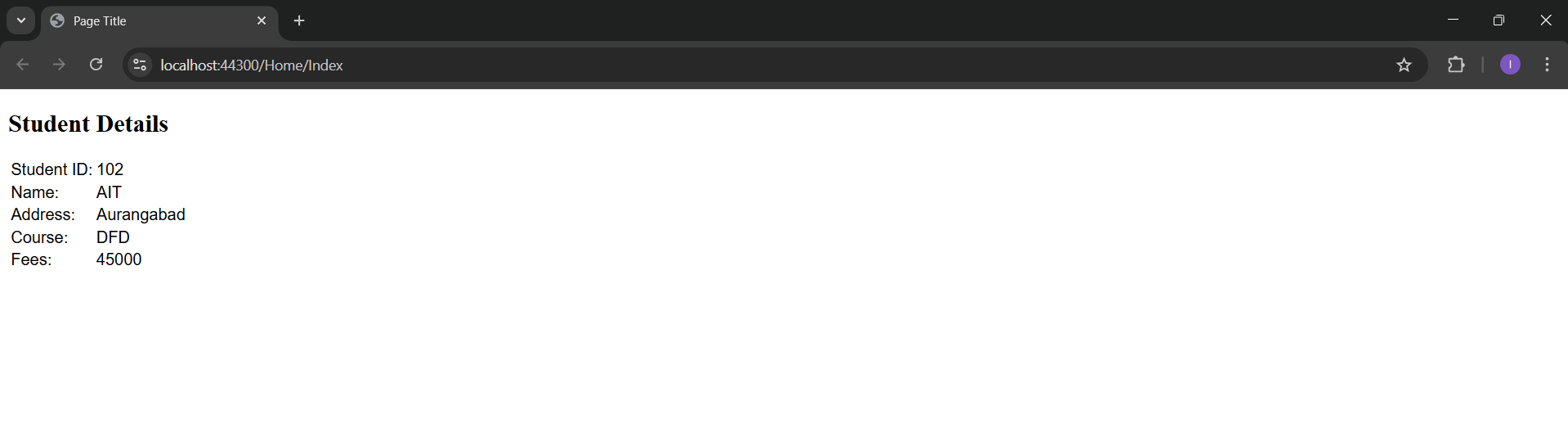
Application URL
https://localhost:44300/Home/Index